Install
Prerequisistes
Check Compatibilty hardware: Oracle Linux Hardware Certification List (HCL)
A minimum of two (2) KVM hosts and no more than seven (7).
A fully-qualified domain name for your engine and host with forward and reverse lookup records set in the DNS.
/var/tmp10 GB space at leastPrepared a shared-storage (nfs or iscsi) of at least 74 GB to be used as a data storage domain dedicated to the engine virtual machine. ISCSI need to be discovered before oVirt install.
If you are using iSCSI storage, do not use the same iSCSI target for the self-hosted engine storage domain and any additional storage domains.
The host you are using to deploy a self-hosted engine, must be able to access
yum.oracle.com.Oracle Linux 8.8 (or later Oracle Linux 8 release) for all the Self-hosted and KVM
NTP configured on each hosts
Repo configure and update systems
Some shared storage common to the hosts
Network configuration
- A bond with VLAN tagging:
 1# bond with slave interfaces
 2nmcli connection add type bond con-name bond0 ifname bond0 bond.options "mode=active-backup,miimon=100" ipv4.method disabled ipv6.method ignore
 3nmcli connection add type ethernet con-name eno12409np1 ifname eno12409np1 master bond0 slave-type bond
 4nmcli connection add type ethernet con-name eno8403 ifname eno8403 master bond0 slave-type bond
 5nmcli con mod bond0 primary eno12409np1
 6
 7# VLAN ip on bond
 8nmcli connection add type vlan con-name vlan123  ifname bond0.123 dev bond0 id 123
 9
10# Network config on vlan
11nmcli con mod vlan123 +ipv4.dns "192.168.123.10,192.168.123.20" +ipv4.addresses 192.168.123.xxx/24 +ipv4.gateway 192.168.123.1 +ipv4.dns-search "example.com" +ipv4.method manual +ipv6.method ignore
- Simple interface with VLAN tagging:
1nmcli connection add type vlan con-name vlan3333 ifname eno1239.3333 dev eno12399np0 id 3333 ip4 3.3.3.xxx/24 gw4 3.3.3.1
Install of Self-hosted engine on First host
1dnf install oracle-ovirt-release-45-el8  -y
2dnf install ovirt-hosted-engine-setup -y
3dnf install tmux -y
4tmux
5hosted-engine --deploy --4
NB:
- Choose [No] for Keycloak (preview not available on OLVM)
- Choose [Static] at VM network
- Choose [iscsi] for storage (depends on what you have)
Install KVM on secondary nodes
- After that Self-hosted engine* is deployed and reachable, start to deploy secondary host:
1dnf config-manager --enable ol8_baseos_latest
2dnf install oracle-ovirt-release-45-el8
3dnf clean all
4dnf repolist
- Then on Virtmanager console > Administration > Hosts > add a host
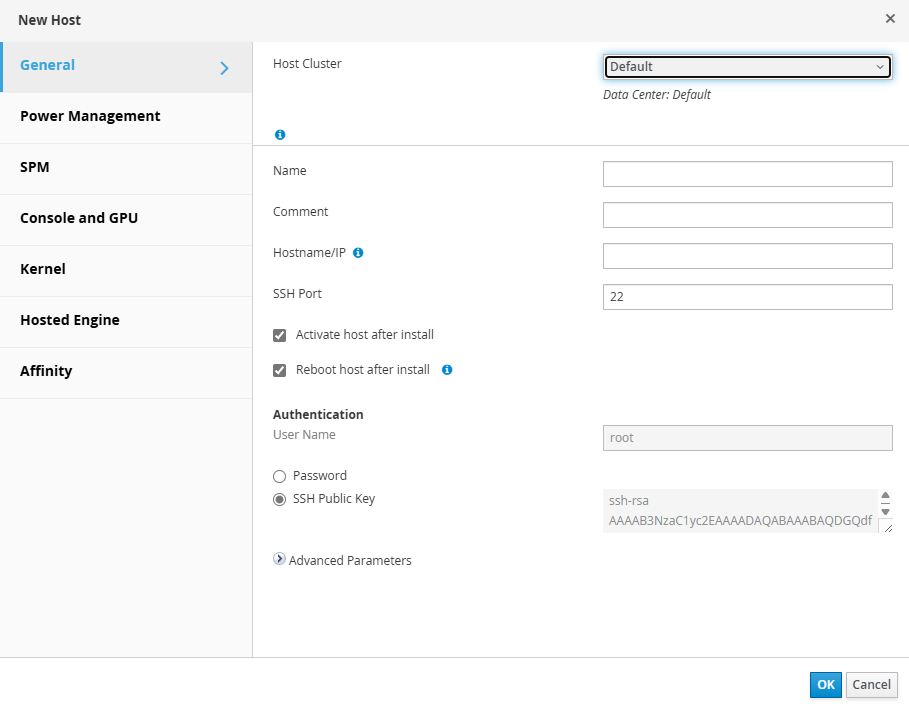
- Take and copy the SSH publickey from above windows to the secondary hosts:
1mkdir /root/.ssh
2chmod 700 /root/.ssh
3chmod 600 /root/.ssh/authorized_keys
4chown root:root /root/.ssh/authorized_keys
5vi /root/.ssh/authorized_keys
- Choose deploy engine in Hosted Engine:
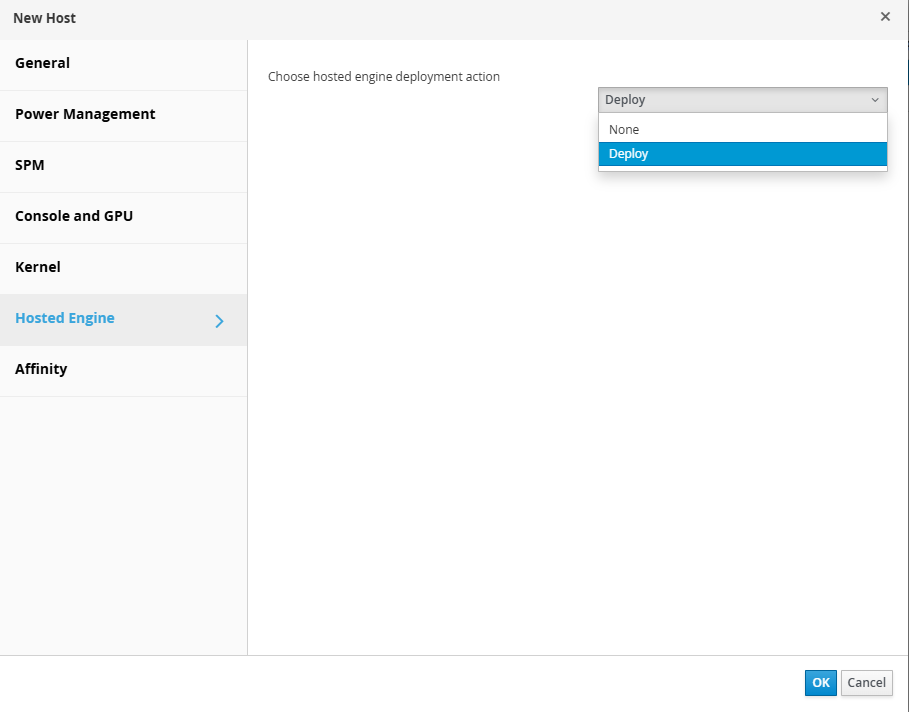
Then click OK to start install
Redefine default route on each hosts after installation:
1nmcli connection modify ovirtmgmt ipv4.routes "0.0.0.0/0 192.168.123.1 400"
2nmcli connection up ovirtmgmt
NB: this is relevant only when you have several network interfaces configured. Because the install reconfigure vlan123 to ovirtmgmt and the route pass second after the NIC that we configure for iscsi. It need to be back to first position.
Troubleshooting or reinstall
- After installation on first node:
1systemctl status -l ovirt-engine
2systemctl status -l ovirt-ha-agent
3
4hosted-engine --check-deployed
5hosted-engine --vm-status
6
7hosted-engine --connect-storage
- Check ovirt services
 1systemctl --list-units ovirt*
 2
 3UNIT                              LOAD   ACTIVE SUB     DESCRIPTION
 4ovirt-ha-agent.service            loaded active running oVirt Hosted Engine High Availability Monitoring Agent
 5ovirt-ha-broker.service           loaded active running oVirt Hosted Engine High Availability Communications Broker
 6ovirt-imageio.service             loaded active running oVirt ImageIO Daemon
 7ovirt-vmconsole-host-sshd.service loaded active running oVirt VM Console SSH server daemon
 8
 9LOAD   = Reflects whether the unit definition was properly loaded.
10ACTIVE = The high-level unit activation state, i.e. generalization of SUB.
11SUB    = The low-level unit activation state, values depend on unit type.
12
134 loaded units listed. Pass --all to see loaded but inactive units, too.
14To show all installed unit files use 'systemctl list-unit-files'.
- If you need to reinstall - cleanup otherwise the second trial will failed:
1/usr/sbin/ovirt-hosted-engine-cleanup
2rm -rf /var/tmp/localvm*
3dnf remove cockpit-ovirt-dashboard -y
4dnf remove ovirt-hosted-engine-setup -y
5# Becarefull to have nothing in your /var/lib/iscsi
6# Then restart ovirt install from scratch