
The context
For my blog, I use HBStack with the
hbcards/theme, which relies heavily on Hugo modules.
This setup makes configuration easier and provides a clean, modular
architecture.
One powerful feature of this theme is the availability of hooks at different levels of the rendering process. These hooks allow us to customize the blog without modifying the theme itself.
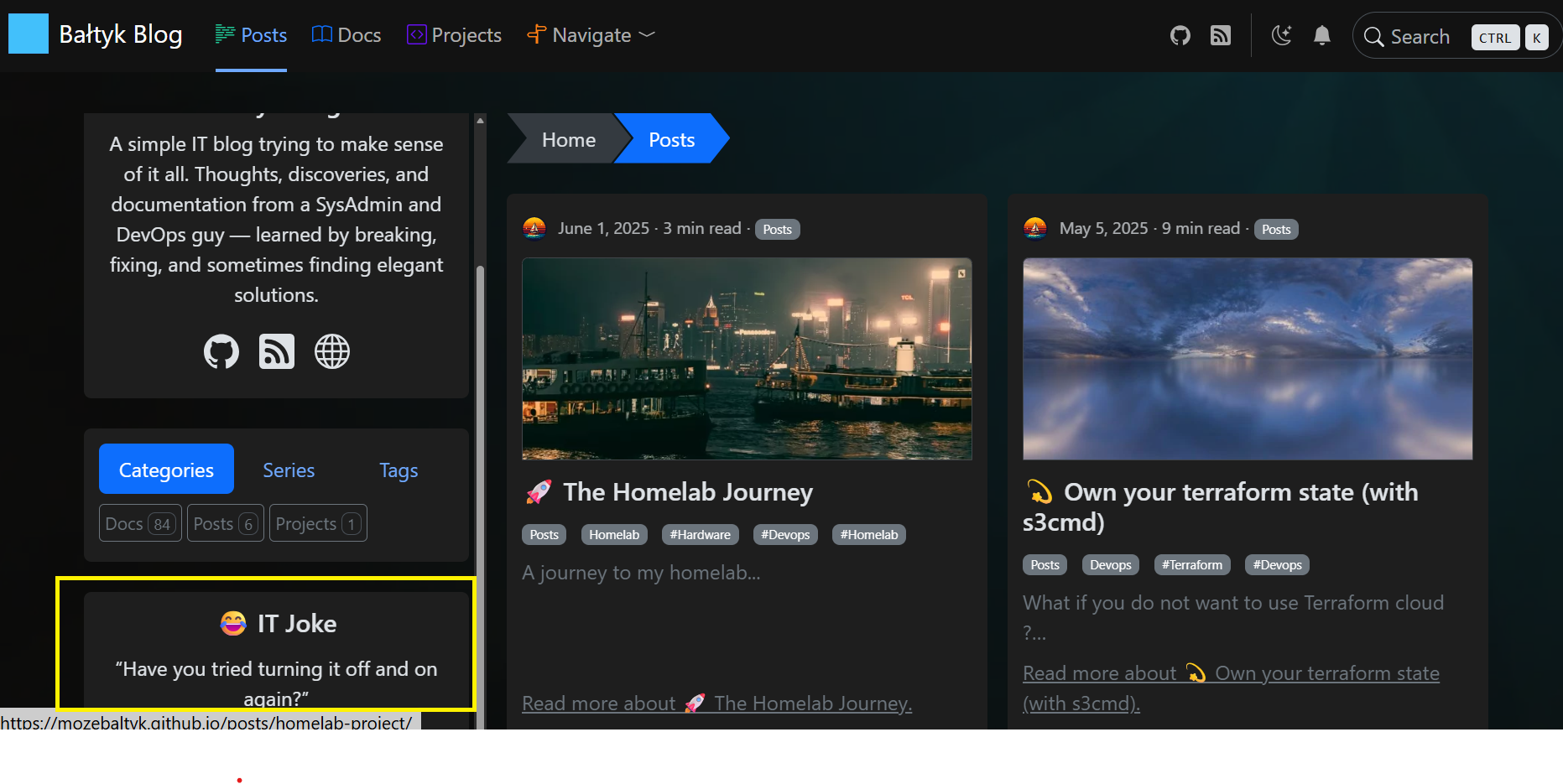
In this article, we will develop a custom sidebar widget that displays a random citation (quote, joke, or technical wisdom) on each page load.
Data in Hugo
At the project root, the ./data directory is used by Hugo at build
time to populate the .Site.Data object.
Hugo supports several data formats including JSON, TOML, YAML, and XML.
For this exercise, I created three data files, each representing a category of citations:
For our exercice, I have created 3 files gathering 3 categories of citations:
1data
2└── sidebar
3    ├── jokes.yaml
4    ├── quotes.yaml
5    └── wisdom.yaml
Because Hugo generates a static website, this data cannot be queried
dynamically at runtime. Instead, the data must be rendered into the HTML
during the build process. So we use for this, a hook given by HB theme layouts\partials\hugopress\modules\hb-custom\hooks\hb-blog-sidebar.html.
To keep the page clean, we embed the data as hidden HTML elements using
data-* attributes. JavaScript can then read these attributes once the
page is loaded in the browser. A loop which use site.Data.sidebar.<filename>
to include the data in the website.
 1<div class="hb-module text-center">
 2  <aside class="hb-sidebar">
 3
 4    <section class="hb-sidebar-box random-citation js-random-citation">
 5      <h5 id="citation-title"></h5>
 6
 7      <blockquote id="citation-content"></blockquote>
 8
 9      <!-- Hidden category data -->
10      <div class="citation-data" hidden>
11
12        <!-- Quotes -->
13        <div class="citation-category" data-category="quote" data-title="💬 Quote">
14          {{ range site.Data.sidebar.quotes }}
15            <div
16              data-text="{{ .text }}"
17              data-author="{{ .author }}">
18            </div>
19          {{ end }}
20        </div>
21
22        <!-- Jokes -->
23        <div class="citation-category" data-category="joke" data-title="😂 IT Joke">
24          {{ range site.Data.sidebar.jokes }}
25            <div data-text="{{ . }}"></div>
26          {{ end }}
27        </div>
28
29        <!-- Wisdom -->
30        <div class="citation-category" data-category="wisdom" data-title="🧠 Tech Wisdom">
31          {{ range site.Data.sidebar.wisdom }}
32            <div data-text="{{ . }}"></div>
33          {{ end }}
34        </div>
35
36      </div>
37    </section>
38
39  </aside>
40</div>
Typescript or Javascript
JavaScript is the language executed by the browser, while TypeScript is a superset of JavaScript that adds static typing and better tooling.
In this project, we write our code in TypeScript (.ts) because:
- It catches errors at build time
- It provides better autocompletion and documentation
- It compiles down to plain JavaScript for the browser
Hugo Pipes automatically compiles the TypeScript file into JavaScript,
so the browser never sees the .ts file directly.
The theme does not automatically include custom JavaScript files. Instead, we explicitly register our TypeScript file using a Hugo hook so it can be compiled and injected into the page.
Let’s take the Example below written in .\assets\hb\modules\custom\js\index.ts:
 1console.log("✅ Random citation script loaded");
 2
 3// Random citation (no dependencies)
 4document.addEventListener("DOMContentLoaded", () => {
 5  const container = document.querySelector<HTMLElement>(".js-random-citation");
 6  if (!container) return;
 7
 8  const categories = container.querySelectorAll<HTMLElement>(
 9    ".citation-category"
10  );
11  if (!categories.length) return;
12
13  // 1️⃣ Pick a random category
14  const category =
15    categories[Math.floor(Math.random() * categories.length)];
16
17  const title = container.querySelector<HTMLElement>("#citation-title");
18  const blockquote = container.querySelector<HTMLElement>("#citation-content");
19
20  if (!title || !blockquote) return;
21
22  title.textContent = category.dataset.title ?? "";
23
24  // 2️⃣ Pick a random item inside the category
25  const items = category.querySelectorAll<HTMLElement>("div");
26  if (!items.length) return;
27
28  const chosen = items[Math.floor(Math.random() * items.length)];
29
30  const text = chosen.dataset.text ?? "";
31  const author = chosen.dataset.author;
32
33  blockquote.innerHTML = `
34    “${text}”
35    ${author ? `<footer>— ${author}</footer>` : ""}
36  `;
37});
38// End of random citation
How to use it
Hugo generates a static website, meaning all processed files are written
to the ./public directory, which is then served by a web server.
After compilation, our TypeScript code is bundled into a JavaScript file
(e.g. hb.js) inside the public directory.
To make the script available on the website, we load it using another HBStack hook located at:
layouts/partials/hugopress/modules/hb-custom/hooks/hb-head-end.html
1{{/* Load custom sidebar JS */}}
2{{ $js := resources.Get "hb/modules/custom/js/index.ts" | js.Build | minify | fingerprint }}
3<script src="{{ $js.RelPermalink }}" defer></script>
The Result
The result is a sidebar widget that displays a different citation each time a page is loaded, creating the impression of randomness while remaining fully static.
Troubleshooting
Inspect the page source and search for the
random-citationclass to verify that the data are correctly embedded.Add a log at the top of
index.ts:
1console.log("Random citation script loaded");
Open DevTools → Console and reload the page.
If the message does not appear, the script is not being loaded.
Verify the hb-head-end.html hook and resources.Get path.
- Test DOM access manually
In DevTools → Console, run to test data access:
document.querySelector(".citation-category div")?.dataset
Data flow diagram
The following diagram illustrates how data flows from Hugo to the browser and finally into the rendered widget.
At no point does JavaScript access Hugo data directly.All data access
happens through the DOM via data-* attributes that were generated at build time.
 1 BUILD TIME (Hugo)
 2 ─────────────────────────────────────────────────
 3
 4   data/sidebar/quotes.yaml
 5   data/sidebar/jokes.yaml
 6   data/sidebar/wisdom.yaml
 7              │
 8              ▼
 9      ┌─────────────────────┐
10      │   .Site.Data        │
11      │   (Hugo context)    │
12      └─────────┬───────────┘
13                │ Go templates
14                ▼
15      ┌─────────────────────┐
16      │ Generated HTML      │
17      │ hidden <div> nodes  │
18      │ data-* attributes   │
19      └─────────┬───────────┘
20                │
21                │ static HTML
22                ▼
23
24 RUNTIME (Browser)
25 ─────────────────────────────────────────────────
26
27      ┌─────────────────────┐
28      │ Browser DOM         │
29      │ (parsed HTML)       │
30      └─────────┬───────────┘
31                │
32                │ JavaScript
33                ▼
34      ┌─────────────────────┐
35      │ index.ts            │
36      │ - select category   │
37      │ - select citation   │
38      └─────────┬───────────┘
39                │
40                ▼
41      ┌─────────────────────┐
42      │ Visible Sidebar     │
43      │ Random citation     │
44      └─────────────────────┘