The context
For my blog, I use HBStack with the hbcards/theme, which relies heavily on Hugo modules.
This setup makes configuration easier and provides a clean, modular architecture.
One powerful feature of this theme is the availability of hooks at different stages of the rendering process. These hooks allow us to customize the blog without modifying the theme itself.
In this article, we will develop a custom sidebar widget that displays a random citation — a quote, joke, or piece of technical wisdom — each time a page is loaded.
Data in Hugo
At the project root, the ./data directory is used by Hugo at build
time to populate the .Site.Data object.
Hugo supports several data formats, including JSON, TOML, YAML, and XML.
For this exercise, I created three data files, each representing a different category of citations:
1data
2└── sidebar
3    ├── jokes.yaml
4    ├── quotes.yaml
5    └── wisdom.yaml
Because Hugo generates a static website, this data cannot be queried dynamically at runtime.
Instead, the data must be rendered into the HTML during the build process.
For this, we use a hook provided by the HB theme:
layouts/partials/hugopress/modules/hb-custom/hooks/hb-blog-sidebar.html
To keep the page clean, we embed the data as hidden HTML elements using
data-* attributes.
JavaScript can then read these attributes once the page has been loaded in the browser.
A loop based on site.Data.sidebar.<filename> is used to include the
data in the generated website.
 1<div class="hb-module text-center">
 2  <aside class="hb-sidebar">
 3
 4    <section class="hb-sidebar-box random-citation js-random-citation">
 5      <h5 id="citation-title"></h5>
 6
 7      <blockquote id="citation-content"></blockquote>
 8
 9      <!-- Hidden category data -->
10      <div class="citation-data" hidden>
11
12        <!-- Quotes -->
13        <div class="citation-category" data-category="quote" data-title="💬 Quote">
14          {{ range site.Data.sidebar.quotes }}
15            <div
16              data-text="{{ .text }}"
17              data-author="{{ .author }}">
18            </div>
19          {{ end }}
20        </div>
21
22        <!-- Jokes -->
23        <div class="citation-category" data-category="joke" data-title="😂 IT Joke">
24          {{ range site.Data.sidebar.jokes }}
25            <div data-text="{{ . }}"></div>
26          {{ end }}
27        </div>
28
29        <!-- Wisdom -->
30        <div class="citation-category" data-category="wisdom" data-title="🧠 Tech Wisdom">
31          {{ range site.Data.sidebar.wisdom }}
32            <div data-text="{{ . }}"></div>
33          {{ end }}
34        </div>
35
36      </div>
37    </section>
38
39  </aside>
40</div>
TypeScript or JavaScript?
JavaScript is the language executed by the browser, while TypeScript is a superset of JavaScript that adds static typing and improved tooling.
In this project, we write our code in TypeScript (.ts) because:
- It catches many errors at build time
- It provides better autocompletion
- It improves code readability and maintainability
- It compiles down to plain JavaScript for the browser
Hugo Pipes can compile the TypeScript file into JavaScript, so the browser
never sees the .ts file directly.
The theme does not automatically include custom JavaScript files.
Instead, we explicitly register our TypeScript file using a Hugo hook so that it can be compiled and injected into the page.
Let’s take the following example, located at:
./assets/hb/modules/custom/js/index.ts
 1console.log("✅ Random citation script loaded");
 2
 3// Random citation (no dependencies)
 4document.addEventListener("DOMContentLoaded", () => {
 5  const container = document.querySelector<HTMLElement>(".js-random-citation");
 6  if (!container) return;
 7
 8  const categories = container.querySelectorAll<HTMLElement>(
 9    ".citation-category"
10  );
11  if (!categories.length) return;
12
13  // 1️⃣ Pick a random category
14  const category =
15    categories[Math.floor(Math.random() * categories.length)];
16
17  const title = container.querySelector<HTMLElement>("#citation-title");
18  const blockquote = container.querySelector<HTMLElement>("#citation-content");
19
20  if (!title || !blockquote) return;
21
22  title.textContent = category.dataset.title ?? "";
23
24  // 2️⃣ Pick a random item inside the category
25  const items = category.querySelectorAll<HTMLElement>("div");
26  if (!items.length) return;
27
28  const chosen = items[Math.floor(Math.random() * items.length)];
29
30  const text = chosen.dataset.text ?? "";
31  const author = chosen.dataset.author;
32
33  blockquote.innerHTML = `
34    “${text}”
35    ${author ? `<footer>— ${author}</footer>` : ""}
36  `;
37});
38// End of random citation
How to use it
Hugo generates a static website, meaning all processed files are written
to the ./public directory, which is then served by a web server.
After compilation, our TypeScript code is bundled into a JavaScript file
inside the public directory.
To make the script available on the website, we load it using another HBStack hook located at:
layouts/partials/hugopress/modules/hb-custom/hooks/hb-head-end.html
1{{/* Load custom sidebar JS */}}
2{{ $js := resources.Get "hb/modules/custom/js/index.ts" | js.Build | minify | fingerprint }}
3<script src="{{ $js.RelPermalink }}" defer></script>
This ensures that the generated JavaScript is included in the page and executed by the browser.
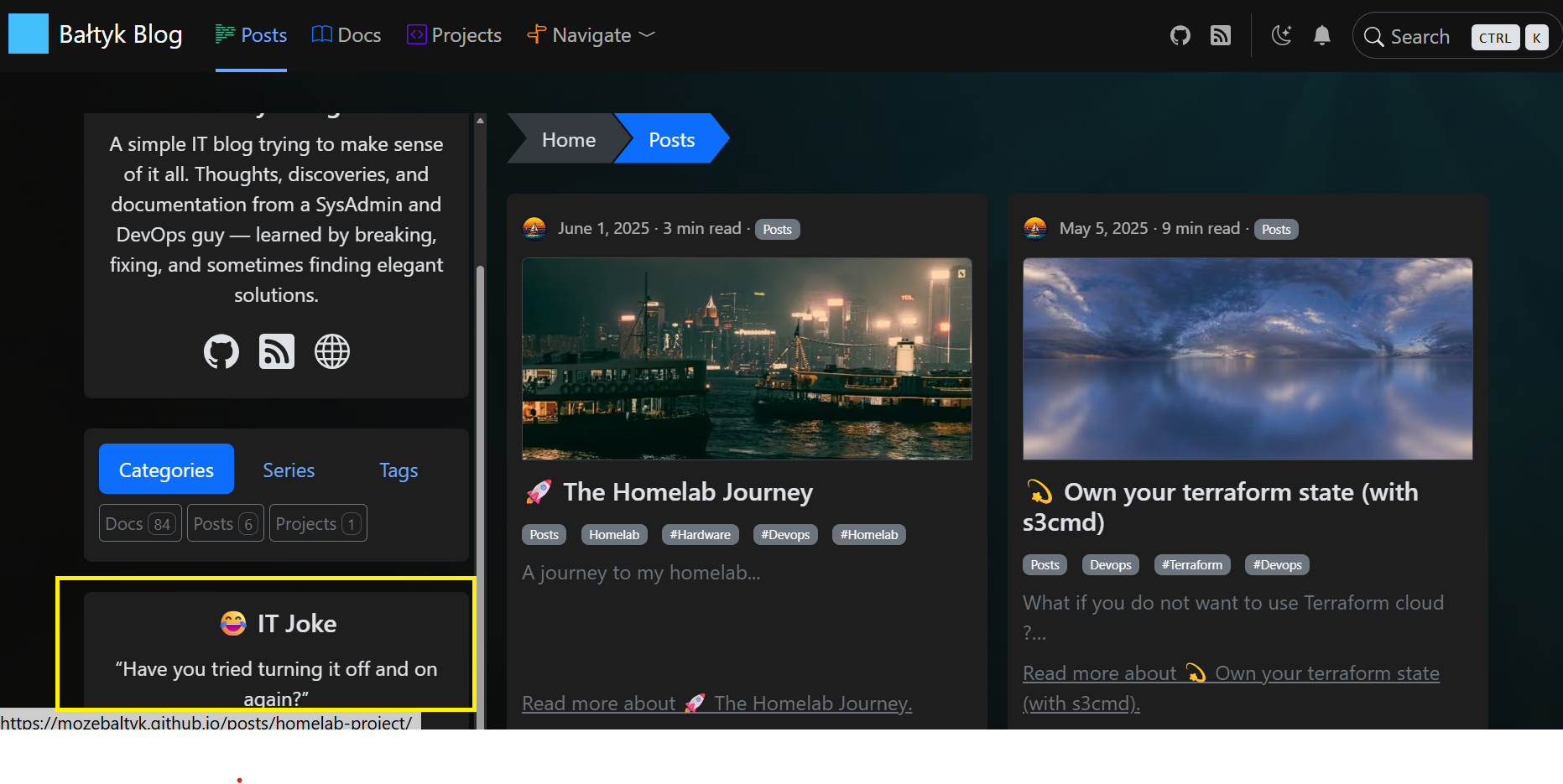
The result
The result is a sidebar widget that displays a different citation each time a page is loaded.
The site remains fully static, while the browser randomly selects which citation to display at runtime.
Troubleshooting
Inspect the page source and search for the
random-citationclass to verify that the data is correctly embedded.Add a log statement at the top of
index.ts:
1console.log("Random citation script loaded");
Open DevTools → Console and reload the page.
If the message does not appear, the script is not being loaded.
Verify the hb-head-end.html hook and the resources.Get path.
- Test DOM access manually.
In DevTools → Console, run:
1document.querySelector(".citation-category div")?.dataset
This allows you to verify that the data-* attributes are accessible from
JavaScript.
Data flow diagram
The following diagram illustrates how data flows from Hugo to the browser and finally into the rendered widget.
At no point does JavaScript access Hugo data directly.
All data access happens through the DOM via data-* attributes that were
generated at build time.
 1 BUILD TIME (Hugo)
 2 ─────────────────────────────────────────────────
 3
 4   data/sidebar/quotes.yaml
 5   data/sidebar/jokes.yaml
 6   data/sidebar/wisdom.yaml
 7              │
 8              ▼
 9      ┌─────────────────────┐
10      │   .Site.Data        │
11      │   (Hugo context)    │
12      └─────────┬───────────┘
13                │ Go templates
14                ▼
15      ┌─────────────────────┐
16      │ Generated HTML      │
17      │ hidden <div> nodes  │
18      │ data-* attributes   │
19      └─────────┬───────────┘
20                │
21                │ static HTML
22                ▼
23
24 RUNTIME (Browser)
25 ─────────────────────────────────────────────────
26
27      ┌─────────────────────┐
28      │ Browser DOM         │
29      │ (parsed HTML)       │
30      └─────────┬───────────┘
31                │
32                │ JavaScript
33                ▼
34      ┌─────────────────────┐
35      │ index.ts            │
36      │ - select category   │
37      │ - select citation   │
38      └─────────┬───────────┘
39                │
40                ▼
41      ┌─────────────────────┐
42      │ Visible Sidebar     │
43      │ Random citation     │
44      └─────────────────────┘